
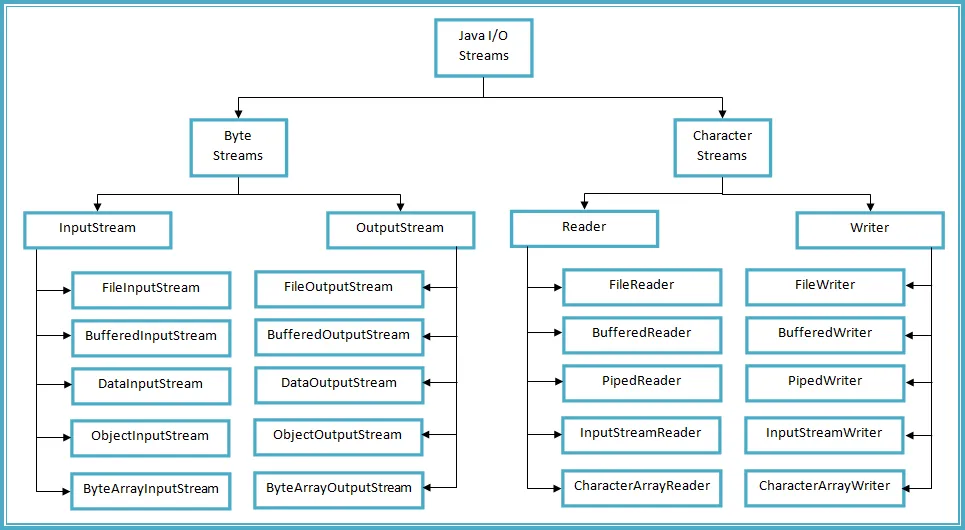
In Java, data handling is fundamental for developing efficient and functional applications. Within this context, one of the key concepts is the difference between a byte stream and a character stream. Both types of streams are used to read and write data, but each has its own specific characteristics and uses. Understanding these differences is essential for choosing the appropriate stream type based on the needs of the program being developed. The characteristics of each stream type and their applications will be explored in detail below.
What is a byte stream?
A byte stream is a sequence of data that represents information in the form of bytes. This type of stream is primarily used for working with binary data, such as images, audio, and other non-text file types. Byte streams in Java are part of the Input/Output (I/O) library and are used through classes like InputStream and OutputStream. These classes allow you to read and write data in the form of bytes, which is essential for handling files that are not strictly text-based.
Byte streams are especially useful when you need to manipulate data in its original form, such as when reading an image or audio file. For example, when using a byte stream to read an image, you can access all the image data without worrying about character encoding. This allows the program to process the image as is, resulting in more efficient and straightforward data handling.
Advantages of byte streams
- Flexibility: Byte streams can handle any type of binary data, making them very versatile.
- Performance: Reading and writing data in the form of bytes is usually faster than in the form of characters, especially for large files.
- Compatibility: They are ideal for working with non-text files, such as images and videos.
In addition to the advantages mentioned, byte streams are essential in situations where precise control over data is required. For example, when working with audio files, it’s necessary to access the data in its original form to process it properly. In this way, byte streams allow for greater freedom in data manipulation, which is fundamental in many modern applications.
What is a character stream?
On the other hand, a character stream is a sequence of data that represents information in the form of characters. This type of stream is primarily used for working with text and is fundamental for applications that require the manipulation of character strings. In Java, character streams are handled through classes like Reader and Writer, which allow reading and writing data in the form of characters, using specific encodings such as UTF-8 or ASCII.
Character streams are especially useful when working with text files, such as documents or configuration files. When using a character stream, the programmer doesn’t have to worry about converting bytes to characters, as these classes automatically handle the encoding. This simplifies the process of reading and writing text, making it easier and less prone to errors.
Advantages of character streams
- Simplicity: Character streams are easier to use for working with text, as they automatically handle encoding.
- Readability: When working with text, data is more understandable and easier to manipulate.
- Integration: They integrate well with other libraries and tools that work with text.
The advantages of character streams become clear in applications that require the manipulation of textual data, such as word processors or data analysis applications. The ability to work directly with characters facilitates the implementation of functions like text search and replace, as well as user input validation. This is especially important in the development of user-interactive applications, where readability and usability are crucial.
Key differences between byte streams and character streams
One of the most important differences between byte streams and character streams is how they handle data. While byte streams work directly with binary data, character streams convert that data into characters using a specific encoding. This difference is fundamental and affects how streams are used in different situations. For example, when reading a text file with a byte stream, the data is obtained in the form of bytes, which would require further conversion to be interpreted as text.
Another significant difference is performance. Byte streams are typically faster for reading and writing data, especially with large files. This is because byte streams operate at a lower level, allowing for more direct access to the data. In contrast, character streams can introduce some overhead due to the need to convert between bytes and characters, which can impact performance in applications that require high efficiency.
Summary of differences
- Data type: Byte streams handle binary data, while character streams handle text.
- Encoding: Character streams use encodings to convert bytes into characters, which does not happen in byte streams.
- Performance: Byte streams are typically faster than character streams when reading and writing data.
These differences make each type of stream suitable for specific situations. For example, if you’re developing an application that needs to manipulate images or audio files, a byte stream would be the best option. On the other hand, if you’re working on an application that requires text manipulation, such as a text editor, a character stream would be more appropriate. By understanding these differences, developers can make more informed decisions about which type of stream to use in their applications.
When to use byte streams and when to use character streams
The choice between a byte stream and a character stream largely depends on the type of data being handled. If the goal is to work with binary data, such as images, videos, or compressed files, then a byte stream is the better option. This type of stream allows for more efficient data handling, as no additional conversion is required. For example, when loading an image from a file, using a byte stream is essential to ensure that all the image data is retrieved without any loss of information.
On the other hand, if you’re working with text data, such as text files, documents, or user input, you should use a character stream. This type of stream simplifies the process of reading and writing text, as it automatically handles the encoding and conversion of bytes to characters. This is especially useful in applications where user interaction is key, such as web forms or text editors. Using a character stream in these cases not only improves efficiency but also reduces the possibility of encoding-related errors.
Examples of use
- Byte streams: Loading and saving images, working with audio files, manipulating binary files.
- Character streams: Read and write text files, process form data, handle character strings.
Ultimately, the choice between a byte stream and a character stream isn’t just a matter of preference; it should be based on the specific needs of the application being developed. By understanding the characteristics and advantages of each stream type, developers can optimize their applications and ensure they handle data as efficiently as possible.
Considerations when working with byte and character streams
When working with byte and character streams, it’s important to consider certain factors that can affect application performance. One of the most critical considerations is encoding. When using character streams, specifying the correct encoding is essential to ensure data is interpreted properly. For example, if you’re reading a file that uses UTF-8 encoding, you must specify this encoding when creating the character stream. Otherwise, the characters may not be rendered correctly, which can lead to application errors.
Another important consideration is exception handling. When working with input and output flows, exceptions related to reading and writing data are likely to occur. Implementing proper exception handling is essential to ensure the application can handle errors effectively. This includes using try-catch blocks to catch exceptions and take necessary actions, such as closing flows or notifying the user about the error.
Best practices
- Specify the encoding: Always specify the encoding when working with character streams.
- Exception handling: Implement try-catch blocks to handle errors effectively.
- Closing flows: Make sure to close flows after use to free up resources.
Finally, it’s important to remember that the choice of flow type affects not only performance but also the quality and robustness of the application. By following best practices and considering the specific needs of the data being handled, developers can create more efficient and reliable applications.
Practical examples in Java
To better illustrate the difference between byte streams and character streams, the following are practical examples of how to use both types of streams in Java. These examples will help you understand how they are implemented in practice and how they can be applied in different situations.
Example of a byte stream
The following is a simple example of how to read an image file using a byte stream. This code uses the FileInputStream class to open the file and read the data as bytes:
import java.io.FileInputStream; import java.io.IOException; public class ReadImage { public static void main(String[] args) { String filePath = “image.jpg”; FileInputStream bytestream = null; try { ByteStream = new FileInputStream(filePath); int data; while ((data = ByteStream.read()) != -1) { // Process the image data } } catch (IOException e) { e.printStackTrace(); } finally { if (ByteStream != null) { try { ByteStream.close(); } catch (IOException e) { e.printStackTrace(); } } } } }
In this example, an image file named “image.jpg” is opened and the data is read as bytes. The while loop continues reading until there is no more data. It is important to close the loop at the end to release the resources used.
Example of character flow
The following is an example of how to read a text file using a character stream. This code uses the FileReader class to open the file and read the data as characters:
import java.io.FileReader; import java.io.BufferedReader; import java.io.IOException; public class ReadText { public static void main(String[] args) { String filePath = “text.txt”; BufferedReader characterStream = null; try { characterStream = new BufferedReader(new FileReader(filePath)); String line; while ((line = characterstream.readLine()) != null) { System.out.println(line); } } catch (IOException e) { e.printStackTrace(); } finally { if (charStream != null) { try { charStream.close(); } catch (IOException e) { e.printStackTrace(); } } } } }
In this example, a text file named “text.txt” is opened, and the lines of the file are read using a BufferedReader. This approach is more efficient for reading text because it allows you to read entire lines at once. As in the previous example, it’s important to close the flow at the end to release the resources used.
Conclusions on the use of flows in Java
Ultimately, the choice between a byte stream and a character stream in Java depends on the specific needs of the application and the type of data being handled. Understanding the key differences between these two stream types is fundamental to developing efficient and effective applications. By following best practices and considering the characteristics of each stream type, developers can optimize their applications and ensure they handle data in the most appropriate way.
In summary, when working with flows in Java, it’s essential to consider the nature of the data, the coding, and performance. This will allow developers to make informed decisions and create applications that are not only functional but also efficient and reliable.
